Start Me Up! Tab
The “Start Me Up!” tab contains those items that define how the configuration will be saved, and
where icons to the application will be installed:
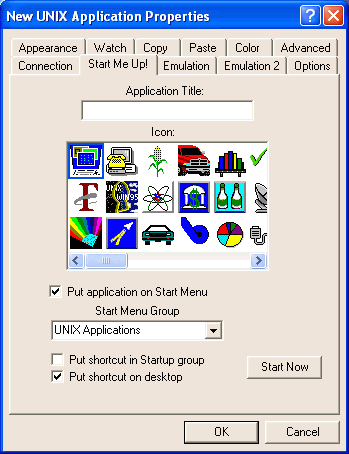 Enter the name you want to give to the application. This will be the name in
the title bar of the application when you run it, and it will be the name of
the FacetWin terminal emulator configuration file with the .fwt extension added.
Do not add the .fwt extension yourself. The title can contain upper and lower
case. Spaces are allowed in the name, but periods “.” are not allowed.
Choose the icon that you want to represent this application. You choose one
of the icons by clicking on it.
The icons that are presented for your use are in the “Icons” sub-directory of the FacetWin installation directory on your PC. There are
more icons in the “Iconlib” sub-directory. If you want to add them to the list presented for your use in
the terminal emulator, then copy them from the Iconlib directory into the
Icons directory. Note, the display of the “Start Me Up!” tab of the property sheet will be slowed by adding too many icons to the
Icons directory.
Enter the name you want to give to the application. This will be the name in
the title bar of the application when you run it, and it will be the name of
the FacetWin terminal emulator configuration file with the .fwt extension added.
Do not add the .fwt extension yourself. The title can contain upper and lower
case. Spaces are allowed in the name, but periods “.” are not allowed.
Choose the icon that you want to represent this application. You choose one
of the icons by clicking on it.
The icons that are presented for your use are in the “Icons” sub-directory of the FacetWin installation directory on your PC. There are
more icons in the “Iconlib” sub-directory. If you want to add them to the list presented for your use in
the terminal emulator, then copy them from the Iconlib directory into the
Icons directory. Note, the display of the “Start Me Up!” tab of the property sheet will be slowed by adding too many icons to the
Icons directory.
- Put application on Start Menu
Check this box if you want to put this application on the Windows Start Menu.
The default setting for this option is on.
If you are putting the application on the Start Menu, you may select the group
that it goes in here. The default group is “UNIX Applications.”
- Put shortcut in Startup group
Regardless of the menu group you selected in the previous option, you may
additionally specify that the application should go in the Startup group so that it
is automatically started when Windows is started on the PC. The default
setting for this option is off.
If you check this box, the icon for the application will be put on the Windows
desktop, so that it can easily be started by double-clicking the icon on the
desktop. The default setting for this option is off.
Click on this button if you want to remove the application and all of its
shortcuts in the menu or on the desktop. If the emulator is currently connected to
the server, this button will be disabled.