Paste Options Tab
The Paste Options tab contains options which determine the rate at which
pasted characters will be fed to the destination application, and a setting that
determines whether CR/LF pairs in the clipboard data should be converted to CR
only:
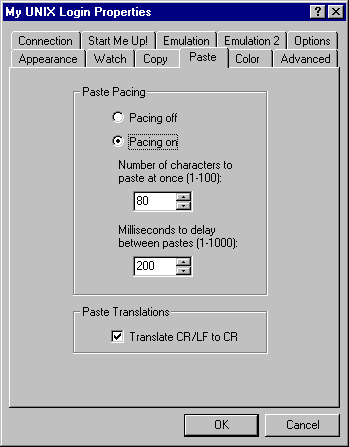 Paste pacing causes the text on the clipboard to be sent to the server
application in multiple transmissions with a limited number of characters in each
transmission and with a delay between each transmission. Because a paste appears
to be keyboard input to the server application, there are sometimes timing
constraints on how quickly the server can handle the characters without losing any
of them. If paste pacing is off, all of the characters on the clipboard will be
sent at once. If it is on, then the number of characters specified on the
property sheet will be sent with the delay specified between each transmission.
The default setting for this option is on.
Paste pacing causes the text on the clipboard to be sent to the server
application in multiple transmissions with a limited number of characters in each
transmission and with a delay between each transmission. Because a paste appears
to be keyboard input to the server application, there are sometimes timing
constraints on how quickly the server can handle the characters without losing any
of them. If paste pacing is off, all of the characters on the clipboard will be
sent at once. If it is on, then the number of characters specified on the
property sheet will be sent with the delay specified between each transmission.
The default setting for this option is on.
- Number of characters to paste at once
This setting specifies the number of characters to send in a single paste
transmission if paste pacing is on. The default value is 80 characters.
- Milliseconds to delay between pastes
This setting specifies the number of milliseconds to wait between paste
transmissions if paste pacing is on. The default value is 200 milliseconds.
Check this box if you want carriage return / line feed pairs (CR/LF) to be
converted to carriage return only before pasting to the server application. While
the normal text clipboard format on Windows has CR/LF pairs terminating each
line, most UNIX applications expect you to type a carriage return only at the
end of each line. Therefore, when connecting to a UNIX server, you probably want
to have this option turned on. The default setting is on.