Emulation2 Tab
The Emulation2 tab contains some additional emulation options:
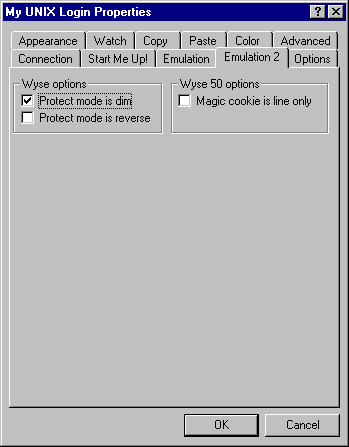
- Wyse options – Protect mode is dim
This check box affects the appearance of characters that have the protect
attribute set. On a real WYSE terminal, the character would change from normal to
dim. On the FacetWin DT Terminal Emulator, the character changes from the
default color set on the emulation tab to the other color in the color pair. LT.
GREEN would change to GREEN, and appear dim. However, GREEN would change to LT.
GREEN. Applications using dim should use the LT. colors if this is not the
desired effect.
- Wyse options – Protect mode is reverse
This check box affects the appearance of characters that have the protect
attribute set. It causes the character to be displayed reverse video of how it
would otherwise be displayed.
- Wyse50 options – Magic cookie is line only
This option controls whether a WYSE 50 magic cookie's effect continues all the
way to the end of the screen (box is cleared) or stops at the end of the line
(box is checked). Depending on the application, having the box checked may
make the visual effect better and the emulation faster.