Connection Tab
The following is the Connection tab for a FacetWin DT terminal emulation
configuration:
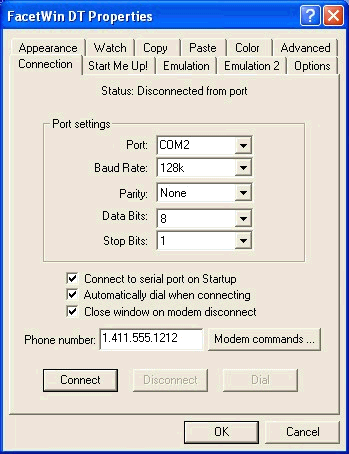 This defines the PC port to be used for the dial-up connection.
This defines the speed of the dial-up connection.
This defines the parity selection for the dial-up connection.
This defines the number of data bits configured for the dial-up connection.
This defines the number of stop bits configured for the dial-up connection.
This defines the PC port to be used for the dial-up connection.
This defines the speed of the dial-up connection.
This defines the parity selection for the dial-up connection.
This defines the number of data bits configured for the dial-up connection.
This defines the number of stop bits configured for the dial-up connection.
- Connect to serial port on Startup
Check this box if you want to automatically connect to the serial port when
you startup the emulator with this configuration. This usually the way you will
want to set it up, but you may have some special consideration that requires
that you not connect immediately when the emulator is started. The default
setting for this option is on.
- Automatically dial when connecting
Check this box if you want to automatically dial the phone number in the Phone
number field whenever you are connecting.
- Close window on modem disconnect
Check this box if you want the emulator window to be closed whenever FacetWin
DT disconnects from the modem.
This field is used to store the phone number of the computer to be dialed.
- Connect, Disconnect and Dial buttons
These buttons are used to make an immediate connection, to disconnect, or to
dial the modem.