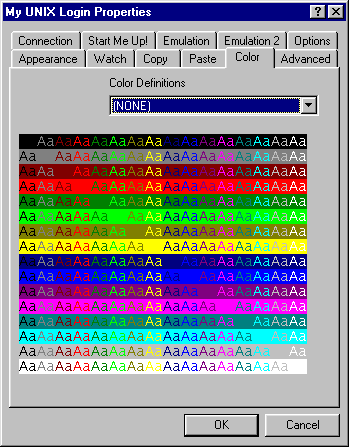
Color Tab
The Color tab provides a method for you to choose an alternate set of colors
to be used in the terminal emulation window. For example, if you use a
combination of foreground and background colors that are difficult to read with the
standard set of colors used by the terminal emulator, then you may select an
alternate set of colors that makes this foreground/background combination readable.
 This drop down box contains a list of color definition files that were found
in the color subdirectory of the FacetWin installation directory on the PC.
These files specify alternate sets of colors that may be used with the terminal
emulator. If you find that the normal colors used by the terminal emulator are
not optimum for some of the color combinations you are using, you may select an
alternate color set here. The name of each color definition file provided with
FacetWin DT describes the basic effect of the color set (such as brighter
foreground colors).
This display area shows the effect of the colors that are used by the color
definition file selected above. This display shows every foreground color on
every background color. This allows you to preview the effect of a color
definition file before closing the property sheet and having the color change applied
to the terminal emulator window.
This drop down box contains a list of color definition files that were found
in the color subdirectory of the FacetWin installation directory on the PC.
These files specify alternate sets of colors that may be used with the terminal
emulator. If you find that the normal colors used by the terminal emulator are
not optimum for some of the color combinations you are using, you may select an
alternate color set here. The name of each color definition file provided with
FacetWin DT describes the basic effect of the color set (such as brighter
foreground colors).
This display area shows the effect of the colors that are used by the color
definition file selected above. This display shows every foreground color on
every background color. This allows you to preview the effect of a color
definition file before closing the property sheet and having the color change applied
to the terminal emulator window.